Storybook & Atomic Design - 1.10. - Building Our Footer
by Jack Pritchard
Hey! This post's a little over two years old now, so some of what's here might be out of date. Still worth a read, but if anything really matters to you, it's worth double-checking against a newer source too.
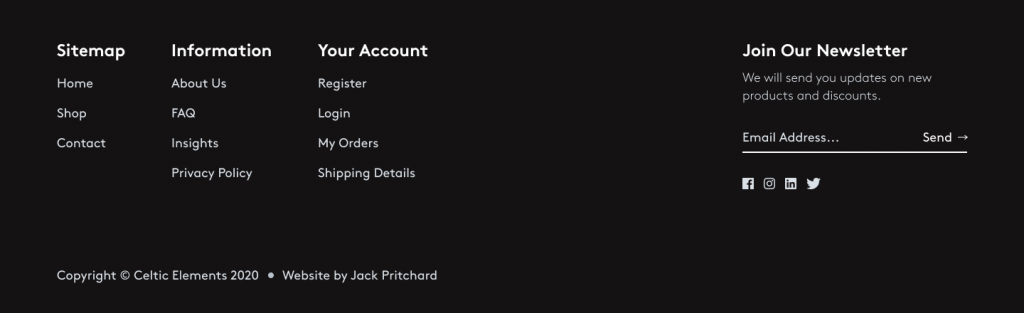
In this lesson, we'll be building our Footer component. The Footer component falls under the concept of an organism, as it could contain molecules and atoms as children nodes.
Initially, we will focus on passing one prop to our Footer component. The prop will be -
menus - array
For each array item in our `navigation'prop we can expect an object with the following keys -
items - array
title - string
For each array item in our `items'prop we can expect an object with the following keys -
We will want to create the Footer component in a new directory under components, organisms then footer. This directory will house the component itself, the associated stories, emulated JSON payload data, and styled-components logic.
Before we get started on the markup required to generate our Footer component elements, let's first import some styles to make our front-end implementation align with the Figma designs I've provided at the start of the course.
Our footer component accepts one prop named `menus'which is an array of objects that we can map over to return the title of the navigation items, followed by an instance of our Navigation molecule component.
First, we start by destructuring the accepted props passed to our Footer component and extract the named value of
menus
.
We start our component by referencing our `StyledFooter'as a parent wrapper of the component HTML elements and React child components.
If
menus'is defined and iterable, the footer component will loop over each node it finds, in this case, we have objects with two keys
items'and
title
. We destructure these values immediately in our array map function and pass them into a return statement.
The return statement renders a
<React.Fragment>'React component for which we use the shorthand
<>'to reference. React fragments allow us to wrap children nodes in an empty component, this is useful as returning our elements directly without a parent wrapper will throw an error, but we don't want to add another HTML node to the DOM.
To keep consistency with our other components and to ensure the Footer component accepts a valid array of values, we will define the propTypes our component should expect.
As we are defining an array of objects, we will use syntax to define a complex set of props using
arrayOf'and
shape'to tell our component to expect an array of objects with specific keys.
arrayOf'tells the component to accept an array for
items`.
shape'allows us to create a custom structure which in this case is an object of keys
items
which is an array we defined in our previous lesson on navigation, and
title'which is a type string.
import React from 'react';
import { arrayOf, shape, string } from 'prop-types';
import StyledFooter from './footer.styles.jsx';
import Navigation from '../../molecules/navigation/navigation';
For the sakes of keeping this lesson shorter, I've gone ahead and structured the other HTML elements inline with the initial Figma mockups.
First, importing four social media logo icons, then structuring a footer newsletter container with a form that holds no functionality yet (we will revisit this later).
Finally, adding a copyright tagline at the bottom of the footer component with credit to myself.
import React from 'react';
import { arrayOf, shape, string } from 'prop-types';
import StyledFooter from './footer.styles.jsx';
import IconFacebook from '../../../assets/images/icons/brands/facebook.svg';
import IconInstagram from '../../../assets/images/icons/brands/instagram.svg';
import IconLinkedIn from '../../../assets/images/icons/brands/linkedin.svg';
import IconTwitter from '../../../assets/images/icons/brands/twitter.svg';
import Navigation from '../../molecules/navigation/navigation';
We can then import the JSON payload in our Footer Storybook story and configure the `array'knob to give viewers of the component an input field to manipulate the prop data fed to the Footer.
Now we have a type defined Footer component which makes use of our smaller component concepts (Navigation molecule) and dynamically renders navigation lists based on the prop data available to the component.